
Last Updated: September 16, 2026
If you have ever opened the Wi-Fi settings on your phone or laptop, you have probably seen a list of network names such as “Home_WiFi,” “TP-Link_1234,” or “JioFiber.” These names are called SSIDs.
So, what is an SSID? SSID stands for Service Set Identifier and is the technical name for a Wi-Fi network name. It allows users and wireless devices to distinguish one Wi-Fi network from another. When a router or wireless access point broadcasts its network, the SSID is normally displayed in the list of available Wi-Fi networks on nearby devices.
Understanding the SSID meaning is useful when setting up a new router, connecting a smartphone or laptop to Wi-Fi, troubleshooting a connection, or securing a home or business network.
What Is an SSID?
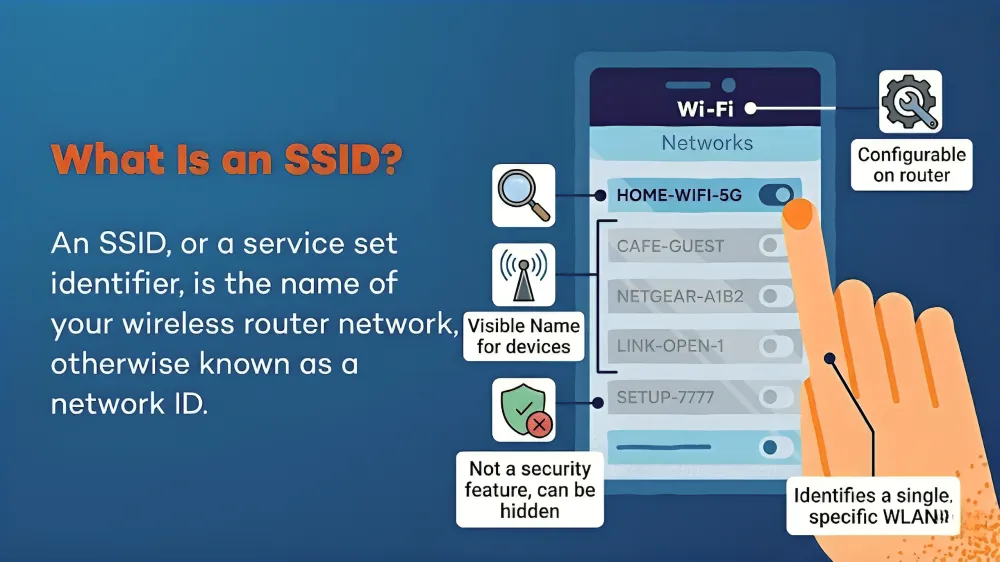
An SSID (Service Set Identifier) is the name assigned to a wireless network. In simple terms, it is the name you see when you search for available Wi-Fi connections.
For example, suppose your router creates a wireless network called “VishalHome.” When you open the Wi-Fi menu on your smartphone, “VishalHome” appears among the available networks. That name is the SSID.
According to NIST, an SSID is a name assigned to a wireless access point that allows stations to distinguish one wireless access point from another. In everyday use, however, it is commonly described as the Wi-Fi network name.
An SSID can generally contain letters, numbers and certain special characters and can be up to 32 characters long under the IEEE 802.11 wireless networking standard. SSIDs are also generally case-sensitive.
SSID Example
Consider a home router with the following details:
| Network Information | Example |
| SSID | MyHomeWiFi |
| Wi-Fi password | ******** |
| Router | TP-Link Archer |
| Security | WPA2/WPA3 |
| Frequency | 2.4 GHz / 5 GHz |
Here, MyHomeWiFi is the SSID, while the password is used to authenticate devices that want to join the network.
SSID Meaning Explained
The SSID meaning becomes easier to understand by breaking down the term.
Service Set Identifier is the formal networking term for the identifier used to distinguish a wireless network. The SSID essentially gives a wireless network a recognizable name.
When several Wi-Fi networks are available in the same location, each network can use a different SSID. For example, an apartment building could have networks named:
- HomeNet_101
- HomeNet_102
- Office_WiFi
- Guest_WiFi
- TP-Link_4589
Your phone displays these names so you can select the network you want to use.
The SSID itself does not provide encryption or authentication. Security is handled by technologies such as WPA2 or WPA3 and the associated network password.
How Does an SSID Work?
When a router or wireless access point provides Wi-Fi, it normally broadcasts information about the network using wireless management frames called beacons. Nearby Wi-Fi-enabled devices can detect these broadcasts and display the associated network names.
The process is relatively simple:
- The router creates a wireless network.
- The network is assigned an SSID.
- The access point broadcasts the SSID.
- Nearby devices detect available networks.
- The user selects the desired SSID.
- The device attempts to authenticate using the appropriate password or authentication method.
- Once authentication succeeds, the device joins the network.
For example, if your router broadcasts “HomeNet,” your smartphone sees “HomeNet” in its Wi-Fi list. After you select it and enter the correct password, the phone attempts to establish a connection.
Therefore, the SSID helps your device identify which wireless network it should connect to, while authentication determines whether the device is allowed to join.
What Is the SSID of WiFi?
The SSID of WiFi is simply the name of the wireless network.
If someone asks, “What is the SSID of your Wi-Fi?”, they are asking for the network name that appears when you open your Wi-Fi settings.
For example:
Wi-Fi name: Home_5G
SSID: Home_5G
The SSID is not the same as your Wi-Fi password. You normally need the SSID to identify the correct network and the password or another authentication method to connect securely.
If your router has separate network names for different bands, you might see something like:
- HomeWiFi_2.4G
- HomeWiFi_5G
In this case, each displayed network name functions as an SSID.
How to Find the SSID of Your Wi-Fi
Finding the SSID of WiFi is usually straightforward. You can normally see it directly in your device’s wireless settings.
On Windows
Click the Wi-Fi icon on the Windows taskbar. The available wireless networks will appear. The network marked as connected is your current SSID.
On macOS
Click the Wi-Fi icon in the macOS menu bar. The network with the connection indicator is the SSID your Mac is currently using.
On Android
Open Settings > Wi-Fi or Settings > Connections > Wi-Fi, depending on your phone manufacturer. The connected network is displayed as the current Wi-Fi network.
On iPhone
Go to Settings > Wi-Fi. The network with the check mark is the Wi-Fi network your iPhone is connected to.
These basic methods are also reflected in guidance from Fortinet and Cloudi-Fi for identifying SSIDs across common devices.
Check the Router Label
If you have not changed the default Wi-Fi configuration, the SSID may also be printed on a sticker on the back, bottom or side of your router.
Manufacturers often print the default Wi-Fi name along with information such as the default password or wireless security key.
If the SSID was changed after installation, however, the name printed on the router may no longer match the current network name.
SSID vs Wi-Fi Password: What Is the Difference?
SSID and Wi-Fi password are two different things.
| Feature | SSID | Wi-Fi Password |
| Meaning | Network name | Authentication credential |
| Main purpose | Identifies the network | Protects access |
| Usually visible? | Yes | No |
| Example | HomeWiFi | MyStrongPass123 |
| Security function | Identification | Authentication |
The SSID tells you which network you are selecting, while the password helps prove that you are authorized to access it.
This distinction is important because simply knowing an SSID does not normally give someone access to a password-protected Wi-Fi network.
Is an SSID the Same as an IP Address?
No. An SSID and an IP address serve completely different purposes.
An SSID identifies a wireless network, while an IP address identifies a device or network interface for communication at the IP networking layer.
For example, “HomeWiFi” could be the SSID of your wireless network, while your router or computer could have an IP address such as 192.168.1.1 or 192.168.1.10.
The SSID is primarily used to identify the wireless network a device wants to join. IP addresses are used for network communication and routing.
What Is a Hidden SSID?
A hidden SSID is a wireless network configured not to advertise its network name in the usual way.
When SSID broadcasting is disabled, the network may not appear in the normal list of available Wi-Fi networks. Users may need to manually enter the network name and security credentials to connect.
However, hiding an SSID should not be considered a strong security measure. A hidden network is not automatically secure, and other wireless information can still reveal its presence. Avira specifically notes that hiding the network name does not itself prevent attackers from monitoring or targeting network traffic.
For better protection, use modern Wi-Fi security such as WPA2 or WPA3 with a strong, unique password.
Can Two Wi-Fi Networks Have the Same SSID?
Yes. Two or more wireless networks can have the same SSID.
This is common when routers retain their manufacturer’s default network names. It can also happen intentionally in homes, businesses and larger wireless deployments.
The problem is that identical network names can make it difficult to determine which network is legitimate. In some circumstances, a malicious actor can create a fake access point using an SSID similar to a trusted network. This is commonly associated with evil twin attacks, where users are tricked into connecting to a fraudulent wireless network.
For this reason, it is useful to give your home network a recognizable SSID rather than simply keeping an easily identifiable default name.
Is It Safe to Change Your SSID?
Yes, changing your SSID is generally a normal part of managing a Wi-Fi network.
A customized name can make it easier to identify your network, particularly when many nearby networks have similar default names. TP-Link and other networking sources recommend customizing network names as part of basic network management.
When choosing an SSID, avoid including unnecessary personal information such as your full name, home address or phone number.
For example, instead of:
Vishal Kumar Home – 123 Delhi
use something less revealing, such as:
HomeNet_24
The SSID should be easy for you to recognize without unnecessarily exposing personal information.
How to Change Your SSID
The exact procedure depends on your router manufacturer, but the general process is:
- Connect your phone or computer to the router.
- Open the router’s administration page or mobile app.
- Sign in using administrator credentials.
- Open the Wi-Fi or Wireless settings.
- Find the SSID, Network Name or Wi-Fi Name field.
- Enter your new network name.
- Save the settings.
- Reconnect your devices using the new SSID and password.
Changing the SSID can disconnect devices that were previously configured to use the old network name, so you may need to reconnect them.
SSID Security Best Practices
An SSID itself is not a security mechanism. The important protection comes from your wireless authentication and encryption settings.
For a safer Wi-Fi network:
- Use WPA2 or WPA3 where supported.
- Create a strong, unique Wi-Fi password.
- Change default router administrator credentials.
- Keep router firmware updated.
- Avoid putting personal information in the SSID.
- Be cautious when connecting to similarly named public Wi-Fi networks.
- Use a separate guest network for visitors when available.
- Do not rely on hiding the SSID as your primary security measure.
Fortinet, Malwarebytes, Avira and Cloudi-Fi all emphasize that the SSID is primarily an identifier and that proper wireless security requires authentication and encryption.
SSID vs BSSID: What Is the Difference?
SSID and BSSID sound similar but identify different parts of a wireless network.
An SSID is the network name users see, while a BSSID (Basic Service Set Identifier) is generally associated with the specific wireless access point or radio, often using a MAC address.
For example, several access points in a large office might broadcast the same SSID, such as “Company-WiFi,” while each access point has its own BSSID.
This allows a wireless network to provide broader coverage while presenting users with a consistent network name.
Final Takeaway: Understanding Your Wi-Fi Network Name
So, what is an SSID? It is the name used to identify a wireless network. SSID stands for Service Set Identifier, and it is the name you normally see when searching for Wi-Fi on a phone, computer, smart TV or other wireless device.
The SSID meaning is therefore straightforward: it identifies the Wi-Fi network you want to connect to. The SSID of WiFi is not the same as its password, IP address or encryption key.
You can normally find your SSID in your device’s Wi-Fi settings or on your router’s label if the default network name is still being used. Although you can hide or customize an SSID, the name itself does not secure your network. Strong authentication, modern encryption, a secure password and updated router firmware remain much more important for Wi-Fi security.
Frequently Asked Questions About SSID
An SSID, or Service Set Identifier, is the name assigned to a wireless network. It is the name you see when you open the Wi-Fi settings on your phone, laptop, smart TV, or other wireless device. For example, “HomeWiFi_5G” can be an SSID.
You can find the SSID of WiFi by opening the Wi-Fi settings on your smartphone or computer. The network showing as connected is usually your current SSID. You can also check the label on your router if you are still using its default Wi-Fi name.
No. The SSID is the name of the Wi-Fi network, while the Wi-Fi password is used to authenticate and secure the connection. For example, “MyHomeWiFi” could be the SSID, while a separate password is required to connect to it.
Yes. You can generally change your SSID through your router’s administration page or mobile app. Look for settings such as Wi-Fi Name, Network Name, Wireless Network Name, or SSID. After changing it, devices connected to the old network name may need to reconnect.
Hiding an SSID prevents the network name from being displayed normally in nearby Wi-Fi lists, but it does not provide strong security by itself. A better approach is to use WPA2 or WPA3 encryption, a strong unique password, updated router firmware, and secure administrator credentials.
Read Related Blogs: