
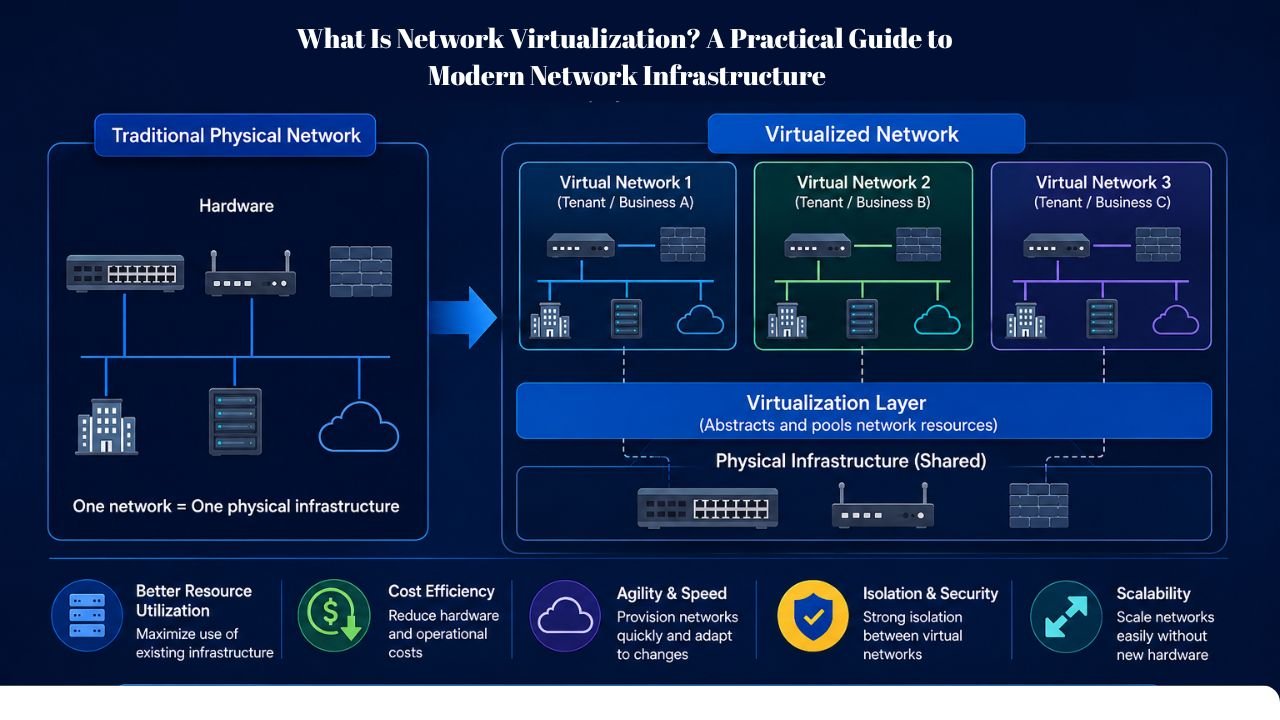
Businesses expect networks to be fast, flexible, and reliable. People inhabit a remote work environment, applications are accessed in the cloud and customers demand real-time access to services. Conventional networking may take care of these requirements, yet it may be costly, needs to be configured manually, and has to be maintained. It is at this point that it would be useful to learn what is network virtualization. Organizations are able to develop, administer and optimize network resources using software instead of solely depending on physical equipment. Consequently, they become more flexible and economical, and meet fluctuating demands more quickly.
Overview of Modern Network Virtualization Architecture
Network virtualization has achieved a lot more than mere virtual local area networks. Containers, remote infrastructures, remote users and cloud applications are supported by modern platforms. Companies are no longer based in one office. Workers are linked to work in different regions, customers around the world connect to services, and software operates on various platforms. Due to this change, networks have to be able to carry dynamic workloads and not a fixed infrastructure.
A virtualized network provides that flexibility by enabling resources to flow where they are needed. As opposed to having to redesign infrastructure whenever the requirement alters, organizations have the capability of modifying configurations using software.
Core Building Blocks
| Component | Purpose |
| Virtual Switches | Manage traffic between virtual resources |
| Virtual Routers | Handle routing functions through software |
| Hypervisors | Connect virtual machines to networks |
| Security Policies | Control access and segmentation |
| Management Platforms | Centralize administration |
These components create a foundation that supports both performance and operational efficiency.
What Is Network Virtualization? Understanding the Core Concept
Network virtualization works similarly. Multiple virtual networks are able to run on the identical physical platform but are independent of each other. The physical hardware will stay, but it is software that defines the allocation and utilization of resources. Rather than setting up each router, switch, and firewall individually, administrators establish virtual networking environments that are flexible enough to meet new needs at a very rapid pace. Consequently, companies become more flexible without having to constantly invest in specialized equipment.
How Network Virtualization Improves Flexibility and Resource Management
The key strength of network virtualization comes from abstraction. The use of software will isolate the networking services and physical equipment, which will enable the administrator to control resources in central systems. An example can be given in a company that is implementing a new customer portal and it might require extra bandwidth. In the case of traditional infrastructure, the expansion may involve new hardware. A virtualized environment enables administrators to distribute resources using software more quickly. This customisability is why more and more organizations are moving away in favour of software-defined infrastructure as opposed to hardware-based ones.
Traditional Networking vs Virtualized Networking
| Area | Traditional Networking | Network Virtualization |
| Resource Allocation | Hardware-dependent | Software-controlled |
| Scalability | Slower | Faster |
| Deployment Time | Days or Weeks | Minutes or Hours |
| Management | Device-by-device | Centralized |
| Hardware Costs | Higher | Lower |
The difference becomes more noticeable as organizations grow and manage larger workloads.
External Network Virtualization vs Internal Network Virtualization: Key Differences Explained
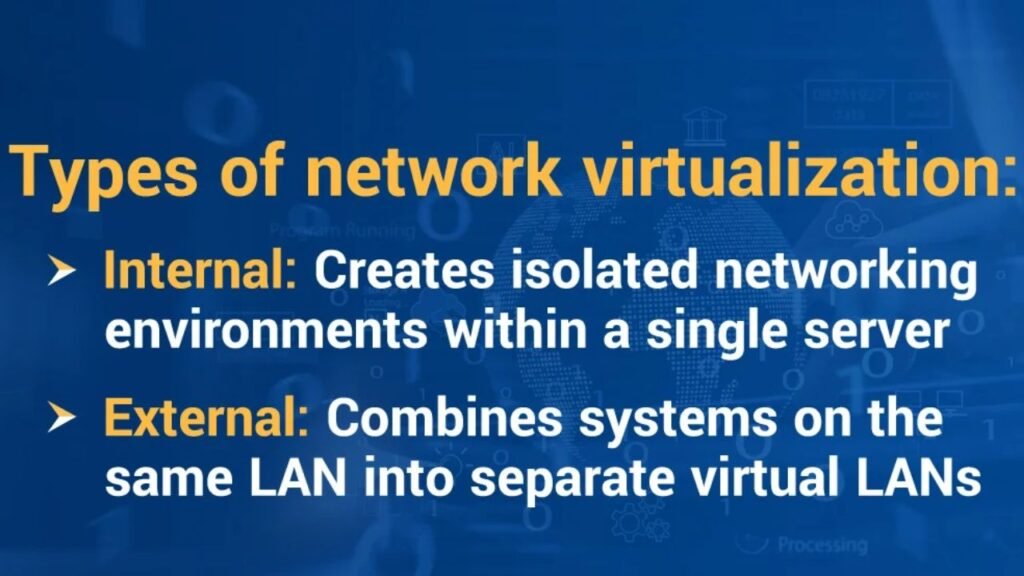
The distinction between external and internal virtualization facilitates the understanding of how, in practical use, organizations utilize these technologies. Both of the methods enhance efficiency. Nevertheless, they deal with various components of the infrastructure.
1. External Network Virtualization
External virtualization focuses on communication between systems. It creates logical networks across multiple devices and locations. This strategy is commonly employed to divide departments, business units or customer environments by many enterprises. Administrators do not need to construct physical networks; they construct isolated, virtual environments that run independently.
A university provides a good example. The physical infrastructure is shared by students, faculty members and administrators. With the help of virtualization, each team has a separate environment provided without being connected to an independent set of hardware.
2. Internal Network Virtualization
Internal virtualization operates within individual servers. It provides isolated networking of applications, virtual machines and containers on the same hardware. This solution enhances workforce management and most appropriate in terms of resources.
A server with several business applications can maintain a separation between them despite their similarities in physical resources. This segregation enhances security and facilitates control.
Comparing Both Approaches
| Feature | External Virtualization | Internal Virtualization |
| Scope | Across networks | Inside servers |
| Focus | Traffic management | Workload isolation |
| Common Use | VLANs | Virtual Machines |
| Administration | Network Teams | Infrastructure Teams |
| Security Benefit | Segmentation | Isolation |
Most enterprise environments combine both methods because they solve different challenges.
Common Business Use Cases of Network Virtualization
Network virtualization is no longer limited to large technology companies. It is used by organizations in various industries to enhance performance, and streamline management, and facilitate digital transformation initiatives. Virtualization is implemented in different industries for various reasons. Others put more emphasis on the concept of scalability, whereas others emphasize security or cost efficiency.
| Industry | Common Use Case |
| Healthcare | Secure patient data environments |
| Banking | Transaction processing networks |
| Retail | E-commerce infrastructure scaling |
| Education | Multi-user campus networks |
| Telecommunications | Network Function Virtualization |
| Manufacturing | Industrial IoT connectivity |
Many organizations begin with a small deployment and gradually expand their virtualized infrastructure as operational requirements increase.
Why Government Agencies Use Network Virtualization for Secure Digital Services
Government agencies often operate some of the largest and most complex networks. They support healthcare systems, citizen services, educational institutions, emergency response operations, and administrative functions. Managing these environments through traditional infrastructure creates challenges. Refreshing hardware becomes costly, scaling is time-consuming, and security demands keep growing. Virtualization can help overcome a lot of these fears by making it easier to manage and optimising the use of resources.
Improving Operational Efficiency
Organizations operating in the public sector often have resources working at more than one place. Virtualized environments enable administrators to create central control while keeping the same policies. This will decrease the number of people operating manually and will assist the IT department in reacting to shifting needs more quickly. In this second example, a state agency implementing a new online service may use software to allocate networking resources and not install other hardware.
Strengthening Security
Security remains a major priority for public sector organizations. Virtualized environments enable workload isolation, segmentation and policy-based access controls. These features assist agencies in constraining possible risks and minimizing attack surfaces. Administrators can subdivide large networks into smaller segments with special security needs instead of securing a single network.
Supporting Large-Scale Growth
The services by the government are growing more into the digital world. Virtualization offers the flexibility required to meet the increased demand without significant investments in infrastructure. Consequently, the agencies are able to modernize the services without affecting the operational performance.
Why Are Businesses Investing in Network Virtualization?
Other organizations perceive network virtualization as a technical uplift in the first place. In reality, it determines business performance, operational flexibility, and customer experience. Companies launch applications faster when networking resources can adapt quickly. They also reduce delays associated with hardware procurement and deployment.
Faster Business Response
The market conditions are dynamic. There are cases where organizations require supporting new services, increasing capacity or amending operations within a very short time. Virtualized infrastructures enable the IT departments to react significantly faster to counterattack as compared to conventional infrastructure.
Better Resource Utilization
Many physical networking equipment uses less than its total capacity. Virtualization assists organizations to utilize resources more efficiently by sharing infrastructure across a number of workloads. This increases efficiency as it minimises wastage, coupled with enhanced performance.
Stronger Support for Cloud Strategies
Cloud computing greatly relies on software-defined networking. As businesses offload workloads to either a public, private, or hybrid cloud environment, they tend to have network virtualization as a component of that migration. The technology gives the flexibility that is required to support distributed apps and remote users.
Challenges Organizations Face During Network Virtualization Projects
Although virtualization offers significant advantages, successful implementation requires careful planning. Organizations that rush migration projects often encounter performance issues, security gaps, or management complexity.
The most successful deployments typically begin with a detailed assessment of existing infrastructure. IT teams must understand how applications communicate, which workloads require isolation, and how resources should be allocated.
Common Mistakes to Avoid
- Migrating workloads without proper planning
- Ignoring security segmentation requirements
- Underestimating bandwidth requirements
- Delaying automation implementation
- Failing to train network administrators
With a solution to these challenges in place early, the deployments can be smoother and more likely to produce better long-term outcomes.
What Is Network Function Virtualization(NFV) and How Does It Work?
While network virtualization focuses on creating virtual networks, it focuses on virtualizing individual network services. Traditionally, organizations have used special hardware appliances to perform a specific task. Firewalls, routers, VPN gateways and load balancers may demand individual devices. NFV or Network Function Virtualization is the replacement of numerous of those appliances with software-based solutions.
Common Functions Virtualized Through NFV
| Function | Traditional Approach | NFV Approach |
| Firewall | Physical Appliance | Virtual Firewall |
| Router | Dedicated Device | Virtual Router |
| VPN | Hardware Gateway | Software VPN |
| Load Balancer | Physical Appliance | Virtual Service |
This shift reduces hardware dependency and improves deployment speed.
Why Network Function Virtualization Matters?
By implementing, deploying, and extrapolating network functions within organizations, without the need to replace equipment, organizations achieve flexibility. NFV has been adopted vigorously by telecommunications providers as it assists in enabling them to provide services more quickly, besides cutting down the expense of infrastructure. NFV can be considered as a key part of modernization strategies, as networks keep being developed.
Top Benefits of Network Virtualization for Modern Enterprises
Virtualization is embraced by organisations for a number of reasons, which are usually determined by flexibility. A virtualized environment enables the administrators to scale resources virtually, without the need to reconstruct infrastructure. This feature helps in business expansion, as well as diminishing operational sophistication.
1. Lower Infrastructure Costs
Hardware expenses remain one of the most visible benefits.Organizations are able to centralize resources and get out of reliance on special networking equipment. This strategy eventually tends to reduce capital spending and maintenance expenses.
2. Improved Security
Segmentation and workload isolation are supported by virtualization. The administrators will be able to isolate sensitive systems and general workloads and can uniformly enforce security policy across the different environments.
3. Greater Scalability
Workloads rarely remain static. The demand of customers varies, applications change and business needs vary. Virtualized environments enable organizations to expand their resources within a short period of time without involving the massive deployment of hardware.
4. Simplified Management
Administrative complexity is minimized on a centralized management tool. Instead of setting up individual devices on an individual basis, teams are able to control large environments via a single interface.
How Virtualization Software Improve Network Performance and Automation?
Every virtualized environment depends on this reliable software. The software develops the abstraction layer between physical hardware and services. It also offers management, automation, security and monitoring. Virtualization would not offer nearly as much with the lack of good software platforms.
Key Capabilities:
Modern platforms help administrators:
- Allocate resources dynamically
- Monitor performance
- Automate routine tasks
- Apply security policies
- Support workload mobility
These capabilities reduce manual effort while improving consistency across environments.
Choosing the Right Platform
The scalability, security, automation and cloud integration and capabilities of the management are aspects that organisations should consider in choosing virtualization solutions. The appropriate platform relies on workload needs, business goals, and future development strategies.
Network Virtualization Trends Shaping Enterprise Infrastructure in 2026
The task of network virtualization is becoming even larger as companies implement cloud-native applications and automated infrastructure. There are several trends that are defining the design and management of modern networks by organizations. AI in network management is gaining prominence. Currently, several platforms rely on AI-based analytics to detect performance problems, anticipate failures and suggest optimisations.
The need for flexible networking architectures is also on the rise due to edge computing. Organizations require virtualized environments to support workloads in data centres, cloud setups, and at remote sites.
Key Trends to Watch
- AI-powered network automation
- Cloud-native networking
- Zero Trust security models
- Edge computing expansion
- 5G infrastructure deployment
- Automated policy management
These developments will continue influencing enterprise networking strategies over the next several years.
How Red Hat Supports Virtualized and Hybrid Cloud Environments
Organizations exploring virtualization often seek platforms that support both traditional and modern workloads. Red Hat Solutions are targeting virtual machines, containers, automation, and hybrid clouds. Such platforms allow business organizations to upgrade infrastructure at a relatively slow pace without significant change to operations. The ability to run virtual machines alongside containerised applications simultaneously is valuable to many organizations.
This approach simplifies modernization efforts because teams do not need to replace existing systems immediately. Red Hat also supports automation and centralized management, which help organizations improve efficiency as environments grow. For businesses planning long-term infrastructure modernization, solutions that combine virtualization, automation, and cloud readiness often provide the strongest value.
Is Network Virtualization the Right Choice for Your Organization?
The answer depends on business goals, infrastructure complexity, and growth plans. Organizations managing cloud workloads, remote teams, or rapidly changing application environments often benefit the most from virtualization. Smaller businesses may start with limited virtualization initiatives, while larger enterprises frequently implement virtualization across networking, storage, and computing infrastructure. The key is identifying where flexibility and automation can deliver the greatest operational value. For many organizations, virtualization is no longer simply a technology upgrade. It has become a foundation for future growth, scalability, and digital innovation.
Conclusion
Understanding what is network virtualization goes beyond learning another technical term. It explains how modern organizations build flexible, scalable, and efficient networks without relying entirely on hardware. Businesses that adopt virtualization often gain faster deployment cycles, stronger security controls, and better resource utilization.
The real value comes from adaptability. As applications evolve, customer expectations change, and cloud adoption expands, virtualized environments make it easier to respond without constantly redesigning infrastructure. That flexibility is one reason network virtualization continues to play a central role in modern IT strategies.
FAQs
Network virtualization uses software to create and manage network resources instead of depending entirely on physical hardware.
Network virtualization creates virtual network resources, while SDN centrally controls and manages network traffic through software.
Yes, network virtualization reduces costs by improving resource utilization and reducing dependence on expensive hardware.
A virtualized network can be highly secure when organizations use segmentation, workload isolation, and strong access controls.
Healthcare, banking, telecommunications, education, retail, and government sectors benefit significantly from network virtualization.
Yes, small businesses can use network virtualization to lower costs, improve flexibility, and simplify network management.
The migration timeline varies by infrastructure size, but most projects take anywhere from a few weeks to several months.
Read More Blogs, May You Like: