
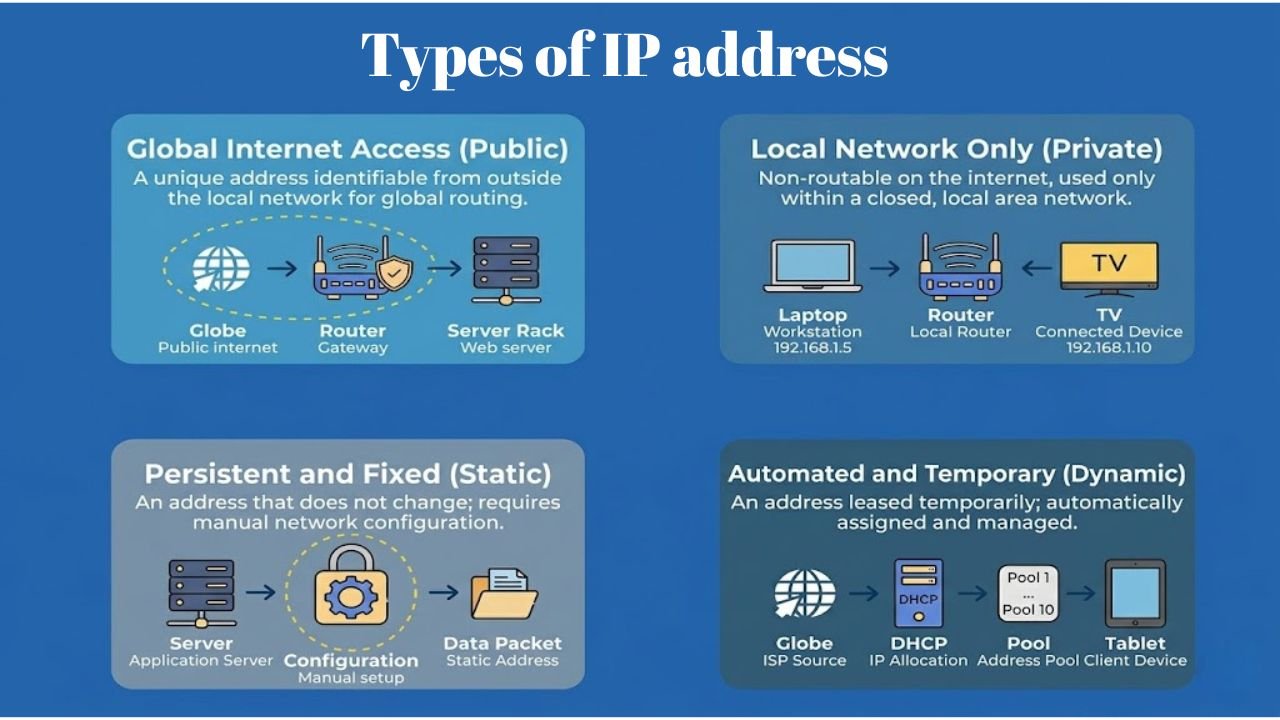
Every time you open a website, watch a video, send a message, or connect a smart device to Wi-Fi, a network quietly works in the background to make that connection possible. Most people use the internet daily without thinking about how devices identify each other. However, each device must have a distinct address to be able to send and receive information properly. This special identity is known as an IP address. You can use a smartphone, a laptop, a gaming console, a smart TV, or any office computer, but an IP address assists your device in interacting with other devices over a network. The online world cannot keep working in the online services without IP addresses, as websites would not be informed where to send data, and emails would not be delivered to customers.
Many people search for the types of IP address because they want to understand how internet communication works. Other users would like to understand the reason why their home devices do not share the same address. Some other people would like to know about IPv4 and IPv6 or why websites have exclusive IP addresses. When you learn these technological concepts, then networking becomes a lot easier to follow.
What Is an IP Address and How Does It Work?
An Internet Protocol Address, or IP address, is a unique series of numbers that identifies a device within a network. It is similar to a digital address, enabling devices to find and talk to each other. Think about the delivery of a package to your house. The courier will need to know your exact position of location in order to deliver the package to you. In the same way, internet servers also require an IP address as it knows where to relay the information. Every Internet request has an IP address to make websites send information back to the appropriate device.
An example is a basic home network. A laptop, smartphone, printer, and smart TV can easily be on the same Wi-Fi router. Although they share a single internet connection, devices are assigned IP addresses individually to enable the router to differentiate the devices.
| Device | Example IP Address |
| Laptop | 192.168.1.10 |
| Smartphone | 192.168.1.15 |
| Smart TV | 192.168.1.20 |
| Printer | 192.168.1.25 |
This unique identification system keeps network communication organized and efficient.
Understanding the Structure of an IPv4 Address
Before exploring the different categories, it helps to understand how an IPv4 address is structured. IPv4 is one commonly used addressing system on the Internet as well as on private networks. An IPv4 address is 32 bits in length and it is represented in dotted decimal form. The speech has four sets of numbers with the use of periods. The range of each group is 0 to 255, which is called an octet.
For example:
| 192.168.1.15 |
This address might seem a simple series of figures, but it has significant information. One section is used to identify the network and the other section is used to identify the particular device that is linked with that network. You may give it some sort of comparison to a residential address. The street name helps identify the neighborhood, while the house number identifies the exact property. The same is true of IPv4 addresses.
Main Components of an IPv4 Address
| Component | Purpose |
| Network ID | Identifies the network |
| Host ID | Identifies the device |
| Address Length | 32-bit |
| Number Format | Dotted Decimal |
Most home users never manually configure these details because routers assign addresses automatically. Still, understanding the structure makes networking concepts easier to grasp.
Versions of IP Address
As internet usage expanded, engineers needed better ways to handle the growing number of connected devices. This requirement led to different versions of IP addressing. Currently, two major versions operate across modern networks. Both perform the same basic function but differ significantly in capacity and design.
IPv4 (Internet Protocol Version 4)
IPv4 is the original version that powered the internet for decades. Most home networks, office networks, and websites still rely heavily on IPv4. This version uses a 32-bit addressing structure, allowing approximately 4.3 billion unique addresses. While that number once seemed unlimited, the growth of smartphones, tablets, smart appliances, cloud services, and IoT devices gradually consumed available addresses.
Examples of IPv4 addresses include:
- 192.168.1.1
- 10.0.0.1
- 172.16.1.25
Key Characteristics of IPv4
| Feature | IPv4 |
| Address Size | 32-bit |
| Address Format | Decimal |
| Example | 192.168.1.1 |
| Total Addresses | About 4.3 Billion |
| Security | Optional IPSec |
IPv4 remains highly popular because countless devices and systems already support it.
IPv6 (Internet Protocol Version 6)
As IPv4 addresses became scarce, networking experts introduced IPv6 to solve the shortage problem. IPv6 uses a 128-bit addressing structure. This expansion creates an enormous address pool capable of supporting future technologies for many years. Unlike IPv4, IPv6 addresses use hexadecimal notation.
Example:
| 2001:0db8:85a3::8a2e:0370:7334 |
Even though it seems longer, the newest operating systems can process the IPv6 form by default without user intervention.
IPv4 vs IPv6 Comparison
| Feature | IPv4 | IPv6 |
| Address Size | 32-bit | 128-bit |
| Address Capacity | 4.3 Billion | 340 Undecillion |
| Format | Numeric | Hexadecimal |
| Security Support | Optional | Built-In |
| Address Availability | Limited | Massive |
Many organizations now operate both versions simultaneously to maintain compatibility while preparing for future growth.
How Many Types of IP addresses exist in Networking?
Many beginners ask how many types of ip address exist in practical networking. While networking includes several classifications, most professionals focus on four primary categories. These categories define how addresses function within networks and on the internet.
The four major categories are:
- Public IP Address
- Private IP Address
- Static IP Address
- Dynamic IP Address
Each category serves a different purpose and plays an important role in network communication.
Types of IP Address With Example and Real-World Uses
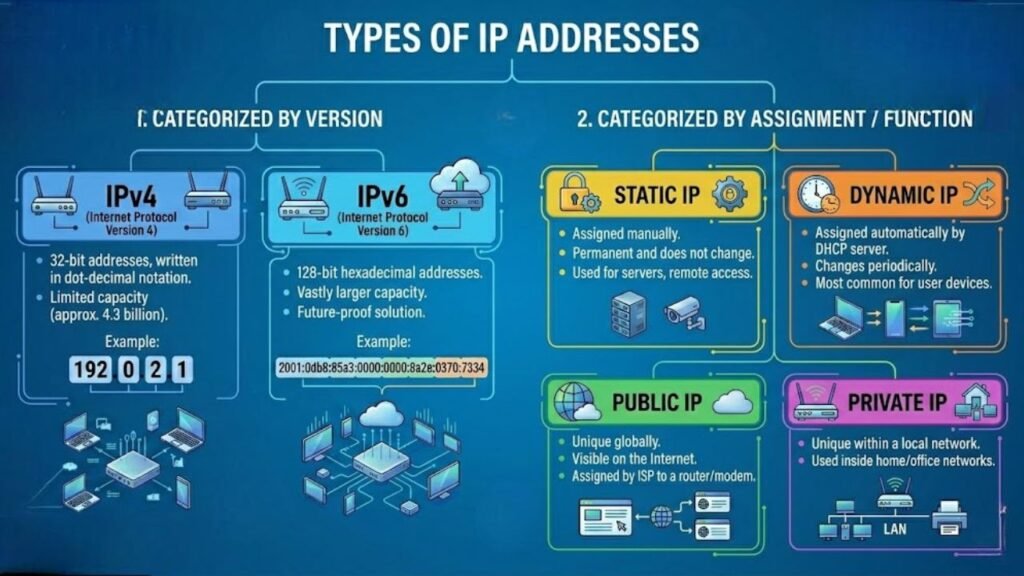
When discussing the types of IP address, public, private, static, and dynamic addresses represent the most commonly used classifications. Each category helps networks operate efficiently while ensuring devices communicate correctly.
Public IP Address: Internet-Facing Network Identity
A public IP address is one that enables communication of devices online. These addresses are allocated to clients and companies by Internet Service Providers. Whenever visiting a website, streaming or using any other online service, your network is associated with a public IP address. Public IP addresses are frequently used in web servers, email and cloud services since users worldwide must utilize them.
A real-world example is a company website hosted on a server, with a public IP address like 49.36.220.15. Once the user keys in the web address into the browser, the internet finds the appropriate server using that public IP and delivers the requested content.
Private IP Address: Internal Network Communication
A private IP address works only inside a local network. Routers assign these addresses to connected devices. Every smartphone, laptop, printer, and smart television inside a home network receives a private address. A practical example helps illustrate this concept. Imagine a family with four devices connected to Wi-Fi. Each device receives a different private IP address even though all devices share one public internet connection.
| Device | Private IP Example |
| Laptop | 192.168.1.10 |
| Phone | 192.168.1.15 |
| Smart TV | 192.168.1.20 |
| Printer | 192.168.1.25 |
The router uses these addresses to identify devices correctly.
Static IP Address: Permanent Network Identification
A static IP address remains unchanged for a long period. Businesses often have static addresses to websites, remote access systems, email servers and so on. As the address will not change, administrators are free to configure services without fear of address change. Businesses also tend to stick to fixed address as it is more stable and less complex to manage the network.
For example, a company website may operate through a static public IP address such as 203.15.100.50. Even if thousands of visitors access the website daily, the server continues using the same address, ensuring uninterrupted connectivity.
Dynamic IP Address: Automatically Assigned Addresses
A dynamic IP address changes periodically. DHCP servers allow the automatic allocation of dynamic addresses by the Internet providers. The dynamic addresses are usually issued to most of the users of residential internet, as they make the management simpler and the process of allocating the addresses more effective. It might seem that your internet connectivity is ideal despite your IP address changing every now and then. The transition is automatically realized without interference to normal use of the internet.
For instance, a home internet connection may receive 103.85.44.12 this month and 103.85.44.98 a few weeks later. Despite the change, browsing websites, watching videos, and using online applications continue without interruption because the ISP manages the transition automatically.
Types of Website IP Addresses for Hosting and Servers
Website hosting environments often use specialized IP configurations. Understanding these configurations helps website owners make informed hosting decisions. The two primary website IP categories are dedicated and shared IP addresses.
Dedicated IP Address
A dedicated IP address belongs exclusively to one website. No other website uses that address. Businesses and companies prefer dedicated IP addresses in most cases, when they anticipate high traffic, or when they need more editing flexibility of the hosting policies. Specific addresses also make server management much easier and provide better isolation from neighboring sites.
Shared IP Address
A shared IP address hosts multiple websites under the same address. Most blogs, small businesses, and personal websites use shared hosting because it significantly reduces hosting costs. For the majority of website owners, shared hosting performs perfectly well and provides excellent value.
Quick Comparison of Dedicated vs Shared IP Address
| Feature | Dedicated IP | Shared IP |
| Cost | Higher | Lower |
| Usage | One Website | Multiple Websites |
| Isolation | Better | Shared Resources |
| Management Control | Greater | Standard |
How Dedicated and Shared IP Addresses Affect Website Performance?
A lot of website owners think that a dedicated IP address will automatically give a boost in the search engine ranking. In actual sense, search engines are mainly concerned with the quality of content, user experience and the performance of the website, other than the kind of IP address being utilized.
A dedicated IP can still provide practical advantages. Companies operating e-commerce stores with simultaneous traffic volumes, with unique server setups, or with high traffic usually choose dedicated IPs since they would allow them more control over their hosting environment. In the meantime, shared IP hosting is an affordable option to blogs, business websites, and portfolio sites.
However, in the case of migrating websites, a lot of novices fear that the shift of a shared IP to a dedicated IP will make the search engine do all the better. In practice, quicker hosting structures and site optimization tend to be significantly more effective in rankings than the type of IP itself.
Types of IPv4 Address Classes and Their Functions
Before modern subnetting became common, network administrators relied on a class-based system to organize IPv4 addresses. This method subdivided the address space available to use into various network sizes and device capacity classifications. Even though modern networks have shifted to the use of CIDR and sophisticated subnetting methods, these classes continue to aid in the understanding of the basis of IPv4 addresses.
There are different purposes of each class. Some classes are used to scale to massive enterprise networks, whereas others are more useful at home and in small businesses. The knowledge of these categories enables one to understand why some address ranges are common in routers, offices, schools and data centers.
Class A Networks: Built for Massive Infrastructure
Class A addresses were intended for those organizations where an extremely large number of devices have to be attached to the same network. Since the first octet only identifies the network, the remaining octets can be utilized by host devices. This is a structure that enables the existence of millions of devices on a single network.
Large government departments, multinational corporations, and internet service providers historically relied on Class A ranges because they offered exceptional scalability. Even today, many enterprises use the private 10.x.x.x range internally because it provides significant room for expansion.
| Category | IP Example | Status |
| Valid Public | 1.0.0.0 | Valid |
| Invalid Format | 1.0.0.0.1 | Invalid |
| Private | 10.0.0.1 | Valid |
| Invalid Format | 10.0.0.0.1 | Invalid |
| Invalid Format | 10.0 0.1 | Invalid |
| Invalid Format | 0.0. 0.1 | Invalid |
| Private | 10.230.5.15 | Valid |
| Private | 10.24.1.53 | Valid |
| Private | 10.24.39.113 | Valid |
| Public | 122.176.18.49 | Valid |
| Public | 183.63.127.22 | Valid |
| Private | 10.24.1.71 | Valid |
| Invalid Format | 10.24.0.1.53 | Invalid |
| Public | 122.176.83.125 | Valid |
| Public | 13.232.238.236 | Valid |
| Public | 111.159.90.132 | Valid |
| Private | 10.24.0.1.71 | Invalid |
| Public | 111.90.150.188 | Valid |
| Public | 124.105.5.80 | Valid |
| Public | 13.127.144.213 | Valid |
| Public | 103.203.136.98 | Valid |
| Invalid Format | 10.24.53 | Invalid |
A useful way to think about Class A networks is to compare them with a large city. The city represents the network, while millions of buildings inside it represent host devices. This design made Class A ideal for organizations expecting long-term growth.
Class B Networks: Balancing Size and Management
Class B addresses occupy the middle ground between massive enterprise environments and smaller local networks. They use the first two octets to identify the network and reserve the remaining octets for devices.
This balance makes Class B practical for universities, healthcare systems, regional corporations, and educational institutions. These organizations often require thousands of connected devices but do not need the enormous capacity available in Class A networks.
| Category | IP Example | Status |
| Public | 183.63.127.22 | Valid |
| Public | 122.176.18.49 | Valid |
| Public | 175.107.59.138 | Valid |
| Public | 164.151.129.231 | Valid |
| Public | 147.50.148.236 | Valid |
| Public | 128.199.182.182 | Valid |
| Class C Example | 192.168.1.6 | Different Class |
| Public | 185.63.253.20 | Valid |
| Private | 172.31.102.40 | Valid |
| Public | 170.254.95.226 | Valid |
| Public | 134.209.250.149 | Valid |
| Public | 142.250.187.174 | Valid |
A university campus provides a good example. Different departments may share the same overall network while maintaining separate internal structures. Class B networks offer enough flexibility to support such environments without becoming difficult to manage.
Class C Networks: The Foundation of Home and Office Networking
When people connect laptops, smartphones, printers, and smart TVs to a Wi-Fi router, they are usually interacting with Class C addressing. These networks dedicate three octets to network identification and one octet to host devices.
Because Class C supports a smaller number of devices, it works perfectly for homes, retail stores, schools, and small businesses. Most consumer routers use addresses from the 192.168.x.x range, which belongs to the private Class C block.
| Category | IP Example | Status |
| Private | 192.168.1.2 | Valid |
| Private | 192.168.1.100 | Valid |
| Private | 192.168.11.1 | Valid |
| Invalid Format | 192.168.1001 | Invalid |
| Incomplete | 169.254 | Invalid |
| Private | 192.168.4.1 | Valid |
| Private | 192.168.1.3 | Valid |
| Private | 192.168.7.1 | Valid |
| Invalid Format | 192.168 l 1.11 | Invalid |
| Private | 192.168.0.254 | Valid |
| Private | 192.168.1.250 | Valid |
| Invalid Format | 192.168 l 254.254 | Invalid |
| Private | 192.168.1.6 | Valid |
| Public | 196.192.73.13 | Valid |
One common networking mistake involves formatting errors rather than address range issues. A missing dot or extra character can make an address invalid immediately. For that reason, network administrators often verify address formatting first when troubleshooting connectivity problems.
Class D Networks: Supporting Multicast Communication
Unlike Classes A, B, and C, Class D addresses do not identify individual devices. Instead, they support multicast communication, which allows one sender to deliver information to multiple recipients simultaneously. Streaming platforms, video conferencing applications, and live broadcasting systems frequently rely on multicast technology. Rather than sending separate copies of the same data to every user, multicast distributes information more efficiently.
| Feature | Details |
| Address Range | 224.0.0.0 – 239.255.255.255 |
| Purpose | Multicast Communication |
| Device Assignment | No |
| Common Use | Streaming and Broadcasting |
This approach reduces bandwidth consumption and improves network efficiency during large-scale content distribution.
Class E Networks: Reserved for Research and Testing
Class E addresses serve a completely different purpose. Network engineers reserved these ranges for experimentation, research, and future developments rather than public networking. Most internet users never encounter Class E addresses during daily activities. However, researchers and technology specialists sometimes use them in controlled testing environments.
| Feature | Details |
| Address Range | 240.0.0.0 – 255.255.255.255 |
| Purpose | Experimental Use |
| Public Deployment | No |
| Typical Users | Researchers and Developers |
Although Class E remains uncommon, it demonstrates how IPv4 designers planned for future innovation while building the original internet infrastructure.
Conclusion
The internet feels simple from the user side, yet countless networking processes work together every second to keep devices connected. IP addressing sits at the center of that communication system. Every webpage you visit, every email you send, and every online service you access relies on IP addresses to move information accurately between devices and networks.
Learning the types of ip address helps you understand what happens behind the scenes whenever a device connects to a network. Public and private addresses handle communication in different environments, while static and dynamic addresses solve different operational needs. At the same time, IPv4 and IPv6 continue supporting billions of connected devices across the world.
If you ever troubleshoot a network issue, configure a router, manage a website, or study computer networking, these concepts will become surprisingly useful. Once you understand how IP addressing works, many networking topics become easier to follow because you can see how devices identify each other and exchange information across the Internet.