
err_connection_reset stops your browser from loading a website because the connection between your device and the server gets cut off mid-process. This normally occurs as a result of VPN problems, firewall hiccups, corrupted cache, or proxy problems. The majority of cases can be resolved in merely minutes when you find the correct cause and implement the corresponding solution.
You are using the normal page, and there comes a time when one page will not load. Chrome then displays a straightforward message in place of your site: This site cannot be connected to, and then a code, err_connection_reset. It is unexpected, yet not accidental. A certain something has broken the handshake between your browser and the server of the site and as soon as you understand what that something is, the problem is often just a few minutes to resolve.
This article takes you on a stroll of how this error occurs and provides you with the five useful fixes, beginning with the simplest ones first. You may be solving your own computer problems, or assisting somebody to understand why their web browser is constantly crashing, but you will find a clear way to a resolution here.
What does err_connection_reset mean?
The err_connection_reset error occurs when the connection between your web browser and a particular site becomes disconnected before the webpage has loaded. Your browser is able to send a request, but something on the path shuts down the connection before the server gives the full response. It is something simple that the site and your browser begin to maintain communication as usual, then there is a failure in the communication path in the middle.
The noise can be the machine, your network, your browser, a VPN, security software or the server that is powering the site itself. With this definition in mind, it is a lot easier to troubleshoot since the error is not typically instigated by a malfunctioning web page. Rather, there is an obstacle or a reset of the communication pathway prior to the completion of the transfer of data.
What Triggers a Connection Reset in Your Browser
Your browser needs to complete a handshake with a server before any page content appears. It makes a request and waits for the response, and then begins to receive data. When that handshake disconnects halfway, the connection reconnects, and this very error appears in your browser.
There are seldom occasions when this mistake has one cause. And there are times when the internet connection itself is not that good. On other occasions, your antivirus software considers a connection to be suspicious and closes it but does not inform you why. So many causes can give you the same message that trial and error will bring to a conclusion ahead of guessing.
To get it comparable, narrowed down, here is a fast method to do it. You can open two or three additional sites in new tabs. When those are loaded without problems, then probably the issue lies with that particular site or a setting on your own computer. Provided that you have anything loading, you need to fix your internet first.
Quick Diagnosis Checklist Before Trying Any Fix
| Quick Check | Possible Conclusion |
| Other websites open normally | Problem may be website-specific |
| Mobile data works but Wi-Fi fails | Network issue |
| Incognito Mode works | Browser extension conflict |
| Another browser works | Browser configuration problem |
| VPN causes issue | VPN-related conflict |
| Multiple devices show same error | Router or ISP issue |
Common Reasons Behind a Reset Connection Error
Errors like err_connection_reset can be caused by a variety of mundane causes, though the majority can be traced to anything interrupting the connection between your computer/internet device and the server you are attempting to connect to. It is much faster to diagnose when these causes are identified.
Here’s what typically causes it:
- VPN instability – your VPN drops or assigns an IP address the website doesn’t trust
- Firewall or antivirus interference – security software flags the connection and shuts it down before data transfers
- Proxy server issues – a misconfigured or unreachable proxy blocks your request before it reaches the website
- Corrupted browser cache – outdated cached files clash with the live version of the page
- Router or modem glitches – a stuck router silently drops connections without warning
This could be when you are sitting in a coffee shop on a company VPN and the Cafe Wi-Fi kills your VPN tunnel briefly. The IP address begins to change in the middle of your session after a visit to the site you are on, and the connection is re-established, as the site no longer identifies you with the same user. Such a situation occurs frequently, particularly in a network in public networks where connections are not as stable to start with.
Most Common Situations That Cause err_connection_reset
While the error can appear almost anywhere, certain situations trigger it more frequently than others. These situations are very common and knowing them assists in narrowing the cause down quicker. The problem is common among many users who use open Wi-Fi networks due to unstable connection issues that often cut off the exchange of information among browsers and servers. Corporate VPNs are known to make resets as well when the IP addresses keep on changing in the middle of a browsing session.
Connection resets are also due to browser misconfigurations, security software conflicts, router overload, and ISP-level network overruns. The first clue to a solution can be the identification of the environment in which the error can be found.
Step-by-Step Fixes for the Connection Reset Error
Before trying anything technical, restart your router first. Unplug it, wait about a minute, then plug it back in. This single step resolves a surprising number of connection-reset cases since it clears temporary glitches in your network hardware without requiring any special knowledge. Once your connection comes back, check whether the error still shows up.
If a router restart doesn’t fix things, move through the following methods in sequence. Each one addresses a different possible cause, so working through them in order saves you time compared to jumping around randomly.
Reconnect Your VPN to Restore a Stable Connection
When you have a VPN on, that connection could be precisely what is causing the reset. In some cases, VPN software loses its tunnel without any clear alertness and in the process, webpages are unable to maintain a consistent session with your gadget. To check if it works, disconnect your VPN and reOpen the page.
This is especially commonly done by workplace VPNs since many corporate networks are configured not to allow all IP ranges to reach particular external sites. Once your VPN assigns you a new IP address that of which the destination website is not aware, the server automatically finishes the connection as a security measure. Sometimes this is remedied by switching to another location of the VPN server.
Reset Your TCP/IP Settings to Default
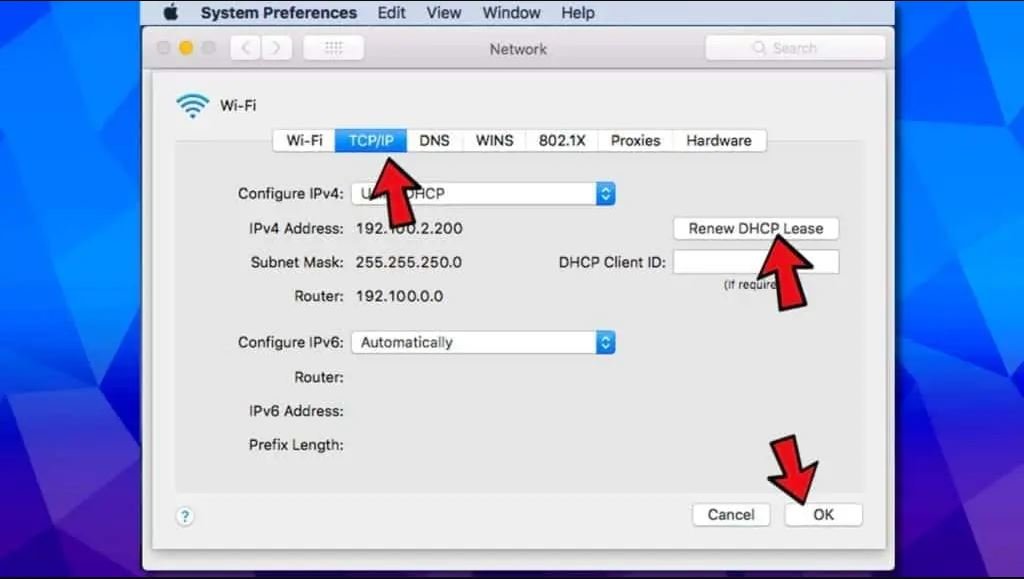
TCP/IP settings are at the lower level of your device, talking over a network. Even a stable internet connection can cause errors, as this one when these settings are corrupted or misconfigured. Formatting them returns them to default networking operation, and most low-level conflicts are cleared during the process.
Resetting TCP/IP on Windows
Open the Start menu, type “cmd,” and run Command Prompt as an administrator. Enter each command below one at a time, pressing Enter after every line:
| netsh winsock resetnetsh int ip resetipconfig /releaseipconfig /renewipconfig /flushdns |
The Final command cleans your DNS cache also, which is important since old DNS entries can cause failure of connections on their own. When you have run all the five commands, restart and test the site again.
Resetting TCP/IP on macOS
Select the active network by going to System settings, Network and choosing your active connection. Click Open Advanced settings, and select TCP/IP tab where “Renew DHCP Lease” is to be selected. This compels the MacOS to seek new network configurations, which the Windows commands do. When the lease finishes, again attempt loading the page.
Turn Off Antivirus and Firewall Temporarily
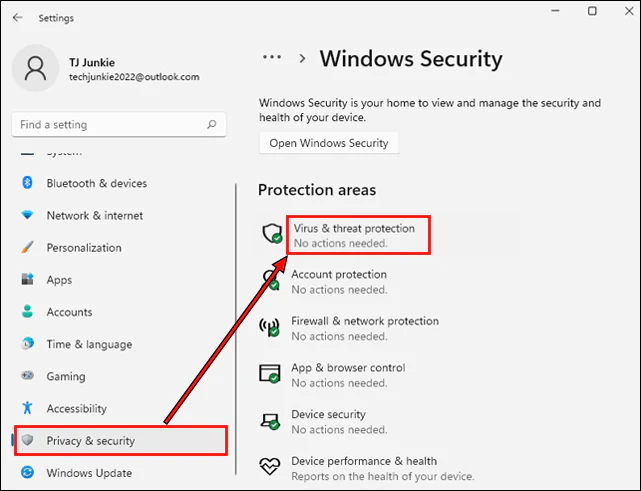
Antivirus programs are available to help defend your device, yet they are occasionally sensitive to normal connections and kill them in an unspecified manner. In case VPN and TCP/IP checkups have failed to resolve your problem, temporarily switch off your antivirus and firewall and then reload the page that provoked the error.
In case once your security software is turned off, the site loads successfully, you have determined the cause. Instead of permanently turning off protection to put your device at actual risk, create an exception of that particular Web site under antivirus configurations. You’ll keep full protection active while still allowing that trusted site through.
Clear Cached Data From Your Browser
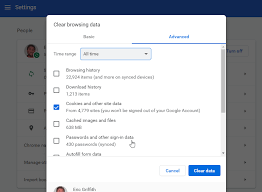
When browsers cache web pages, they will load more quickly when the same web pages are visited. In some cases, that cached information becomes outdated or corrupt, which conflicts with the real site and results in a connection reset rather than a regular page load.
In Chrome, go to Settings and then Privacy and Security, and Clear Browsing Data. Select the box with the heading “Check and Files Cached” and clear data. The process takes just a few seconds, and on completion, reload the page. Firefox, Edge, and Safari have almost the same steps in their privacy settings, and you will not need to re-learn it with each new browser.
Disable a Misconfigured Proxy Server
A proxy server diverts your internet traffic past another server onto which it then directs its ultimate destination. Once that proxy becomes unresponsive, either by failing, or by crawling, or being reconfigured, all connections that use it can have the same reset error.
On Windows, open the Start menu and search for “Internet Options.” Go to the Connections tab and click LAN Settings. If “Use a proxy server for your LAN” appears checked, uncheck it and select “Automatically detect settings” instead. Click OK and reload the website. Unless you need a proxy for specific work or privacy reasons, leaving it disabled solves the problem without any real downside.
Can Browser Extensions Cause err_connection_reset?
Web extensions sometimes access websites without giving them any noticeable alert. The most common causes are ad blockers, security extensions, privacy extensions, and VPN extensions. After the attempts to fix the error, the situation remains unchanged, restart the site in Incognito Mode. Most browsers turn off extensions when in this mode. In case the page is loaded correctly, then it is likely that something has been added to it, potentially causing the problem.
You can then turn off all extensions and then gradually turn off extensions until you can identify where the problem is. This is an effective way of doing it when the error can be seen on a few websites and not on the rest of the web.
When the Problem Isn’t on Your End
Sometimes none of the fixes above change anything, and that usually points toward the website’s server rather than your device. Assume this, but first check the site with an unrelated network, maybe your mobile data plan over your cell phone rather than your home Wi-Fi.
When the error still persists in another network and device, there must be overloading of the hosting server of the webpage, incorrectly configured or out of downtime. By now, it is more logical to contact the support team of the site and leave the rest of the troubleshooting to yourself, as the problem is now completely out of your hands.
Final Thoughts on Fixing Connection Reset Errors
err_connection_reset looks alarming the first time it appears, but it’s rarely a sign that something is seriously wrong with your computer or the site you’re trying to reach. The problem is usually in between your VPN, your network preferences, your security software, or your browsers because each of those has an obvious and easily solvable solution.
Start with restarting a router, as this solves more instances than most individuals anticipate. Next, go through the VPN check, TCP/IP reset, firewall test, cache clear, and proxy settings. After going through all five methods and still this error has not disappeared, then test the site on a totally different network. And when even the problem tracks you in that direction as well, the server of the site is the most probable guilty party, and the next step would be to contact their support team.
FAQs
No. The error usually indicates a network communication problem rather than a malware infection.
Yes. Unstable VPN connections frequently trigger connection reset errors when IP addresses change unexpectedly.
Sometimes. Corrupted cached files can interfere with website loading and produce connection-related errors.
Yes. Incorrect or outdated DNS records can prevent successful communication between your browser and a website server.
The issue may originate from that website’s server, security rules, firewall configuration, or hosting environment rather than your device.
Read About More Common Errors Like This: