
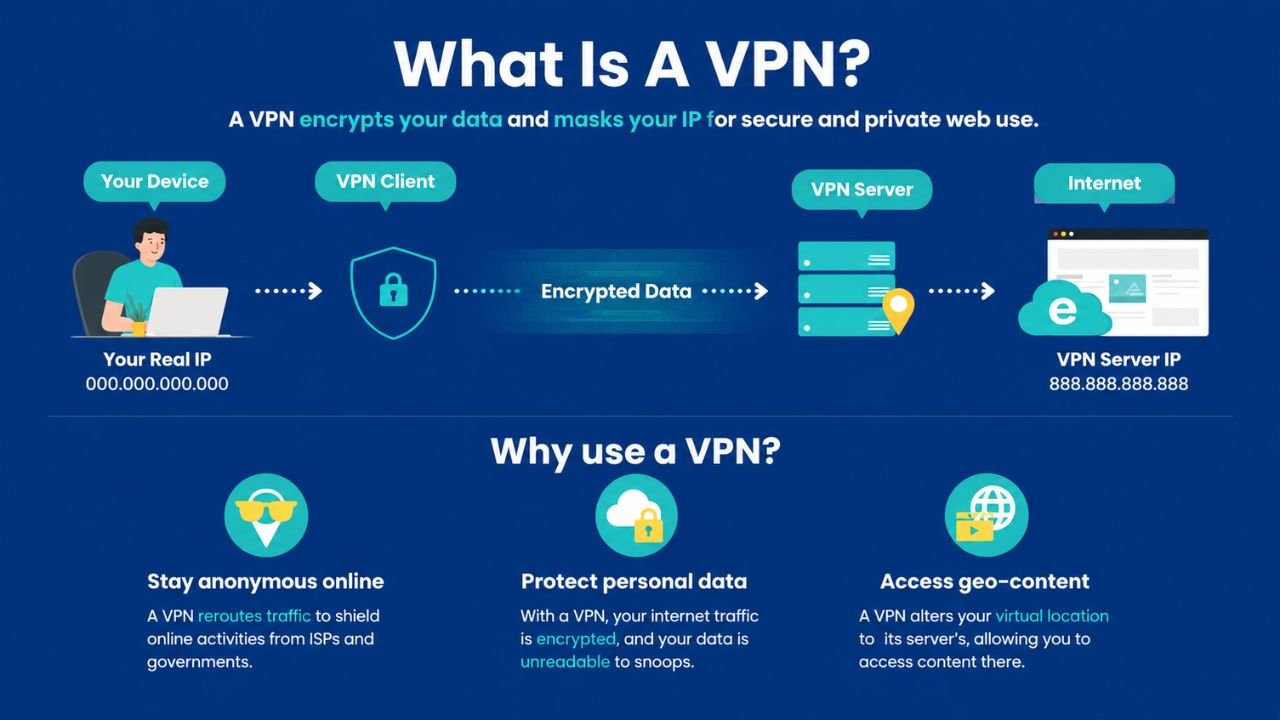
The vast majority of internet users have been exposed to the concept of VPNs, yet not many would know what it entails and why it is so important. VPN, or Virtual Private Network, is one of the security tools that secures your internet traffic and conceals your actual IP from websites, advertisers and even your internet service provider. Be it reading 1,000 blogs without a specific reason, or accessing confidential information every day, a VPN will offer you a level of security that you cannot expect your regular internet connection to offer without assistance. Understanding what is a VPN goes beyond just knowing its definition. It discusses how it operates, the different types available and selecting the appropriate one to suit your needs. Then shall we go through all plain and lucidly.
What Is a VPN and How Does It Protect You
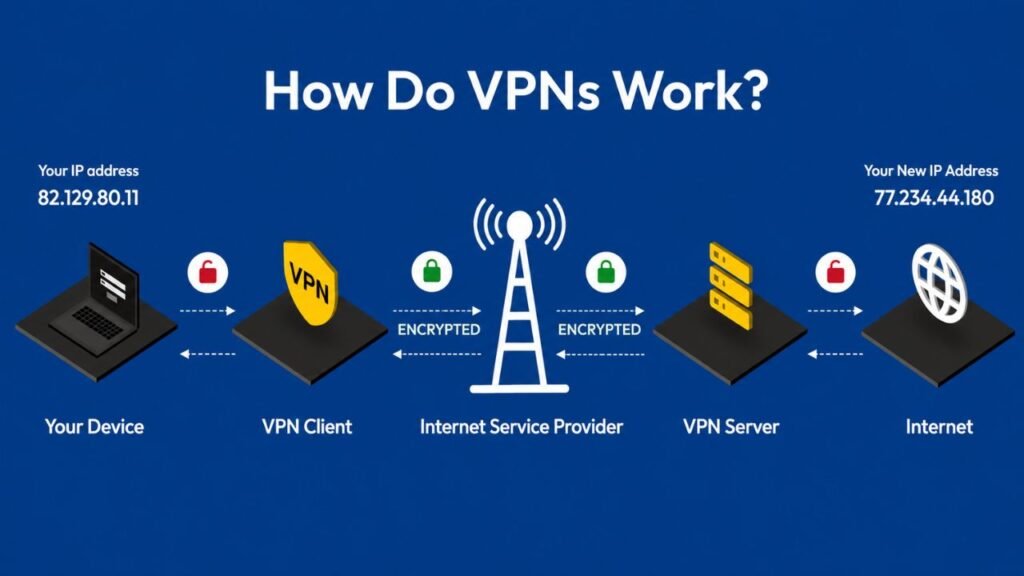
A VPN will establish a secure tunnel between your personal device and a private server. That tunnel passes all your online traffic, as opposed to running directly through your ISP. Due to this, your ISP cannot identify which sites you are going to. Websites are also unaware of your actual IP address, as they only get that of the VPN server. Just consider it a way of sending a package, not marked, but not in a transparent envelope. It is delivered by your postman (ISP) and he cannot read the contents. The receiver (website) is aware that the package was delivered by the delivery hub (VPN server), but not to your home.
AES-256 bit encryption, which is adopted by most VPNs, is the same standard as that used by banks and governments around the world. This encryption cannot be calculated by even strong computers using brute force in any human time scale.
The Core Functions a VPN Performs
- Encrypts all outgoing and incoming internet traffic
- Replaces your real IP address with the VPN server’s IP address
- Prevents ISPs from monitoring or selling your browsing data
- Protects your data on public Wi-Fi networks
- Bypasses geographic restrictions on content and websites
- Hides torrent activity from ISP detection systems
Types of VPN Every User Should Know
There are several distinct types of VPN available, and each one solves a different problem. Choosing the wrong type wastes money and leaves gaps in your security. So understanding each option clearly is the right place to start.
Remote Access VPN
A remote access VPN links one device to a personal server via the internet. This is the most widely used one by common users. It works by sending your app, you tap connect and your traffic goes straight through the encrypted tunnel. VPNs such as Nord VPN, Express VPN, and Surfshark are all remote access VPNs.
This kind is ideal when it comes to individual privacy, accessing foreign content and when it comes to staying safe on open Wi-Fi. To illustrate this, in case you would like to check your bank account and you are at an airport, a remote access VPN keeps your data secret from all other people in that network.
Site-to-Site VPN
A site-to-site VPN links two or more complete networks or networks, as opposed to single equipment. These types of companies with offices in two or more cities are used to have all locations connected on a single shared internal network. Workers can get access to the same internal systems within one city to the farthest city and all in a secure way.
This category further divides into two parts. A site-to-site VPN is an intranet-based VPN that is used to connect offices belonging to the same organisation. A version based on the extranet links two different companies that require a common yet safe and secure access to certain resources.
SSL/TLS VPN
The security protocol used by an SSL VPN is the same as that of HTTPS websites. It also allows users to log into a secure browser instead of an app. This renders the use of SS VPNs highly adaptable since they are applicable in any system capable of supporting a browser.
Businesses provide access to developers or interim employees to internal systems via an SSL VPN portal, and all apps run on dozens of computers. It is a scalable and realistic option to any company in a variety of device environments.
IPSec VPN
IPSec stands for Internet Protocol Security. It works on the network layer and encrypts all IP traffic between two endpoints. Companies whose compliance level is difficult often select IPSec due to the depth of encryption it offers at the infrastructure level.
It supports two modes. Tunnel Mode encrypts all data packets, whereas transport mode encrypts just the payload. IT departments of regulatory sectors, such as healthcare and finance, tend to use IPSec as the fundamental security layer in networking.
L2TP/IPSec VPN
Layer 2 Tunneling Protocol forms making the tunnel structure, and IPSec provides handling the encapsulation on the top. They make a good, most secure joint. The trade-off is though speed. The extra encapsulation results in greater overhead during a process, thus L2TP/IPSec is slower compared to newer protocols such as WireGuard. This combination can still be found in most historic enterprise settings that are yet to migrate to modern alternatives.
OpenVPN
Open VPN is a protocol and complete VPN. Since it is open-source, its code has been under constant scrutiny by security researchers all over the world. Community involvement promptly identifies any vulnerabilities and closes them. OpenVPN allows both TCP and UDP which provides users with an option of connection reliability and speed.
OpenVPN is commonly available as an addition to newer protocols offered by many privacy-conscious vendors, and is often favored by technically savvy users due to its transparency and audit track record.
WireGuard-Based VPN
The latest major VPN protocol is called WireGuard, and it has become a standard in terms of performance in the industry. It has about 4,000 lines of code in its codebase, as opposed to the approximately 70,000 lines in the OpenVPN codebase. This ensures that WireGuard is faster and more auditable, and it cannot keep its vulnerabilities secret.
Nordly VPN created NordLynx based on WireGuard. It is also a primary option of Proton VPN and Mullvad. A VPN based on WireGuard gives the best balance of speed, security, and reliability to the majority of users today.
Types of VPN in Networking for Business Environments
When IT professionals discuss types of VPN in networking, discussing infrastructure choices as opposed to consumer choices. The most VPN types are usually deployed in large organisations concurrently. Remote access VPNs are installed at the home of remote workers. Site-to-site VPNs are used to connect a branch office to another. SSL portals enable the access to limited resources by partners and contractors.
This stacked technique provides security teams with a detailed grasp of who gets access to what, at every tier of the network within the organization. It also minimises the vulnerability of one point of failure that may bring down the whole system.
VPN Types Comparison:
| VPN Type | Best For | Encryption Level | Speed | Typical Users |
| Remote Access VPN | Personal privacy, streaming | High (AES-256) | Moderate to Fast | Consumers, remote workers |
| Site-to-Site VPN | Connecting office networks | High | Fast | Enterprises |
| SSL/TLS VPN | Browser-based remote access | High | Moderate | Employees, contractors |
| IPSec VPN | Network-layer enterprise security | Very High | Moderate | IT departments |
| L2TP/IPSec VPN | Corporate double-layer security | High | Slower | Businesses, legacy setups |
| PPTP VPN | Legacy systems only | Low (outdated) | Very Fast | Legacy infrastructure |
| OpenVPN | Security-focused individuals | Very High | Moderate | Privacy enthusiasts |
| WireGuard VPN | Speed and security balance | Very High | Very Fast | Modern VPN users |
Real Reasons People Use a VPN Daily
Understanding what is a VPN becomes much clearer when you look at actual use cases. People do not use VPNs just for privacy. They use them to solve specific, everyday problems that affect their internet experience directly.
Privacy from ISP Tracking
ISPs can track all the sites you visit, all the search results you make and your IP address. They are allowed by law in most countries to sell anonymized browsing data to advertisers. This traffic is encrypted by a VPN, leaving your ISP with nothing more than garbled data heading straight to a single server address. What you really do remains a mystery to them.
Security on Public Wi-Fi
Public networks at coffee shops, airports, and hotels are shared environments. Unencrypted traffic can be potentially intercepted by anyone on the same network. With VPN, your network connection is fully encrypted and thus, someone may intercept your data packets but will be unable to decode a single byte of the packets.
Streaming Content from Other Regions
Netflix USA and Netflix UK carry different content libraries. It is not the case that some shows which are produced in one country will not be found in another. Your streaming platform will then be connected to a VPN server of a particular country, where it will assume the IP address of the country and deliver its localized content. This can be followed with BBC iPlayer, Disney Plus regional libraries, and other geo-restricted applications.
Bypassing Government Censorship
China’s Great Firewall blocks Google, YouTube, Facebook, and thousands of other platforms. According to Security.org research, nine percent of VPN users globally cite bypassing government censorship as their primary reason for using one. Connecting to a VPN server outside the restricted region gives users access to the open internet regardless of their physical location.
VPN Pricing Comparison
| VPN Provider | Monthly Plan | Annual (per month) | Two-Year (per month) | Three-Year (per month) |
| CyberGhost | $12.99 | $4.29 | $3.25 | $2.29 |
| ExpressVPN | $12.95 | $6.67 | n/a | n/a |
| FastestVPN | $10.00 | $2.49 | n/a | $1.11 |
| NordVPN | $11.95 | $4.99 | $3.99 | n/a |
| ProtonVPN | Free (1 device) | Free or up to $24 | $3.29 to $19.96 | n/a |
| PureVPN | $10.95 | $2.99 | $1.99 | n/a |
| Surfshark | $15.45 | $3.19 | $2.19 | n/a |
| TunnelBear | $9.99 | $4.99 | n/a | $3.33 |
| Private Internet Access | $11.99 | $7.50 | $2.19 | n/a |
| IPVanish | $10.99 | $3.99 | n/a | n/a |
How to Choose the Right VPN for Your Needs
The choice of VPN is not only about the cost. Several technical and legal considerations can be made to see whether or not a provider is really safeguarding you, or whether they are simply providing you with a false sense of privacy.
Key Features to Evaluate Before Buying
- Encryption standard: AES-256 is the minimum acceptable standard today
- No-log policy: Look for providers with published third-party audits, not just marketing claims
- Kill switch: This feature blocks all traffic if the VPN drops, preventing IP exposure
- Protocol options: WireGuard offers the best speed and security balance for most users
- Server locations: More locations means more flexibility for geo-shifting
- Simultaneous connections: Check how many devices one subscription covers
- Company jurisdiction: Providers based outside Five Eyes countries have stronger legal privacy protections
VPN Headquarters and Legal Jurisdiction
The location of a VPN company’s headquarters positively influences your level of legal protection. Government orders to produce user data can be imposed on providers based in Five Eyes alliance nations, such as the United States, the United Kingdom, Australia, and Canada as well as New Zealand. Providers located in Panama, Switzerland or Romania do not use such legal frameworks at all, and this provides users with greater protection against the coercive disclosure of their data.
Common VPN Mistakes and How to Avoid Them
Even individuals that utilize VPNs frequently commit mistakes that diminish their safeguards. The awareness of these errors will keep you out of the false sense of security.
- Not enabling the kill switch: Most apps ship with it turned off. Enable it manually right after installation.
- Using a free VPN for sensitive tasks: Free VPNs often fund themselves by logging and selling your data to advertisers.
- Connecting to a distant server unnecessarily: If you only need encryption and not a specific country’s IP, connect to the nearest server for the best speed.
- Assuming a VPN makes you fully anonymous: A VPN hides your IP but does not stop cookie tracking, logged-in account tracking, or browser fingerprinting.
- Ignoring WebRTC leaks: Some browsers expose your real IP through WebRTC even with a VPN active. Test this regularly using a leak testing tool.
VPN Legality Around the World
In the United States, European Union, United Kingdom, and Canada, along with most other Western countries, the usage of VPNs is fully legal. But there is no change in the legality of what you do using a VPN. VPN is not what will legalize illegal downloads or access that is unauthorized. VPN does not violate law; it only involves your privacy.
Some nations limit or prohibit VPNs completely. Nord VPN, Express VPN, HideMyAss and IP Vanish have been blocked by the Russian government. China also allows VPN services to be used only with those approved by the government. Several restrictions differ in extent in Belarus, Iraq, North Korea, and Turkmenistan as well. Before traveling, vacationers must always check destination-country laws on VPNs, as they are enforced and always vary greatly depending on the jurisdiction.
Final Thoughts on VPN Use in 2026
What is a VPN is one of the most practical security tools available to any internet user today. It ensures privacy, protects your information on networks that are not under your control and provides access to content that would not otherwise be provided by geographic restrictions. By knowing the various kinds of VPN in networking, you can get beyond simple tips and select a solution that would be effective in your application.
Personally, a provider offering a verified no-log policy, having their headquarters in a country that is not Five Eyes, and based on WireGuard, can fulfill the majority of privacy requirements. To companies, the correct architecture is determined by either needing to connect remote workers, or needing to connect office networks, or having partners gain access in a controlled manner. The technology copes with all these situations. The difference between finding the right type and defaulting to whichever name you see as per the advertisements is the difference between matching the type to the actual need.
FAQs
A VPN (Virtual Private Network) is a tool that encrypts your internet connection and hides your IP address by routing your traffic through a secure server in another location. This protects your privacy online and keeps your data safe from hackers, ISPs, and third parties.
A VPN works by creating an encrypted “tunnel” between your device and a VPN server. When you browse the internet, your data passes through this tunnel, masking your real IP address and making it appear as if you’re browsing from the server’s location.
Yes, using a VPN is legal in most countries including India, the US, and the UK. However, some countries like China, Russia, and North Korea restrict or ban VPN use. Always check local laws before using a VPN abroad.
No, a VPN does not make you 100% anonymous. It hides your IP address and encrypts your traffic, but your VPN provider can still see your activity. For stronger anonymity, use a VPN with a strict no-logs policy alongside other privacy tools.
A VPN can slightly reduce your internet speed because your data is being encrypted and routed through an extra server. However, a good premium VPN will have minimal impact — often less than 10–20% speed reduction — and some can even improve speeds by bypassing ISP throttling.
Most free VPNs are not fully safe. Many log and sell your data to advertisers, have weak encryption, or contain malware. If privacy is your goal, a reputable paid VPN with a verified no-logs policy is a much safer choice.
A proxy only reroutes your browser traffic and doesn’t encrypt it, while a VPN encrypts all traffic from your device. VPNs offer stronger security, privacy, and work across all apps — not just your browser. For privacy, a VPN is almost always the better option.
Yes, using a VPN on your phone is a good idea — especially when connected to public Wi-Fi networks at cafes, airports, or hotels. Mobile devices are just as vulnerable to data interception as laptops, and a VPN keeps your personal information secure on the go.