
Last Updated: September 9, 2026
If you are searching for 20.0 0.1, you probably mean 20.0.0.1, an IPv4 address that is sometimes used as a gateway or administration address in specially configured networks. Many websites describe 20.0.0.1 as a standard router login address, but there is an important distinction: unlike commonly used private addresses such as 192.168.1.1 and 10.0.0.1, 20.0.0.1 is not within the RFC 1918 private IPv4 ranges. It belongs to the larger 20.0.0.0/8 address block.
This guide explains what 20.0.0.1 means, how to access it when it is configured as your gateway, how to find your actual router IP, common login problems, and important security considerations.
What Is 20.0.0.1?
20.0.0.1 is an IPv4 address written in dotted-decimal format. It consists of four octets: 20, 0, 0 and 1. The address belongs to the 20.0.0.0/8 address block.
It is sometimes presented online as a router or admin IP address. However, it is not a standard private router address in the same way as:
- 192.168.0.1
- 192.168.1.1
- 10.0.0.1
- 172.16.0.1
The 20.0.0.0/8 range is publicly allocated rather than being reserved for private networks. Therefore, you should not automatically assume that typing 20.0.0.1 into your browser will open your home router.
In some enterprise networks, laboratories, VLANs, network simulations and custom configurations, an administrator can nevertheless assign 20.0.0.1 to a local router interface or gateway.
Is 20.0.0.1 a Private IP Address?
No. 20.0.0.1 is not an RFC 1918 private IP address.
The three main private IPv4 ranges are:
| Private IP Range | CIDR |
| 10.0.0.0 – 10.255.255.255 | 10.0.0.0/8 |
| 172.16.0.0 – 172.31.255.255 | 172.16.0.0/12 |
| 192.168.0.0 – 192.168.255.255 | 192.168.0.0/16 |
Because 20.0.0.1 is outside these ranges, it should not be treated as a conventional private home-network address.
This is one of the most important differences between 20.0.0.1 and addresses such as 192.168.1.1.
Can You Log In to 20.0.0.1?
You can access 20.0.0.1 through a browser only if a device on your network is actually configured to respond at that address.
If your router or gateway uses 20.0.0.1, connect your computer or phone to that network first. Then open Chrome, Edge, Firefox or another browser and enter:
Do not enter the address into Google or another search engine. Type it directly into the browser’s address bar.
If the address is configured as the router’s management interface, you may see a login page. Some router-login websites list generic credentials such as admin/admin, admin/password or admin/1234, but these should not be assumed to work for every device. Your router’s label, manual or network administrator is the appropriate source for the correct credentials.
How to Find Your Router’s Actual IP Address
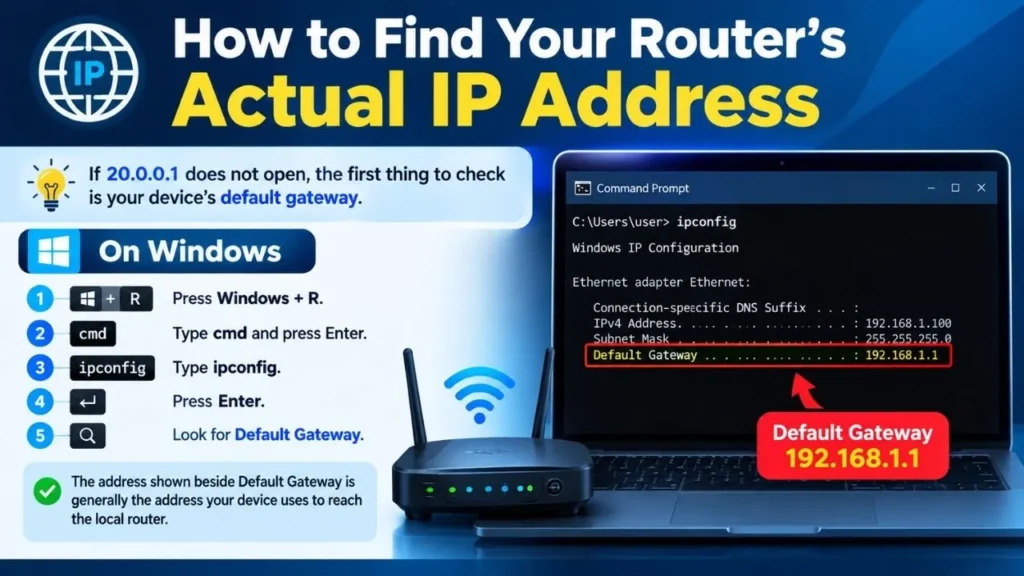
If 20.0.0.1 does not open, the first thing to check is your device’s default gateway.
On Windows
- Press Windows + R.
- Type cmd and press Enter.
- Type ipconfig.
- Press Enter.
- Look for Default Gateway.
The address shown beside Default Gateway is generally the address your device uses to reach the local router.
On Linux or macOS
Open Terminal and use:
ip route
On some systems, you can also use:
route -n
Look for the default route or gateway address.
If your default gateway is 192.168.1.1, for example, there is no reason to use 20.0.0.1 simply because a website lists it as a router-login address.
What Can You Do After Logging In?
If 20.0.0.1 is genuinely the management address of your router or gateway, the available options depend on the device and its firmware.
A network administration panel may allow you to:
- Change the Wi-Fi name (SSID)
- Change the Wi-Fi password
- Configure LAN settings
- Configure DHCP
- Set DNS settings
- Manage connected devices
- Configure VLANs
- Change firewall settings
- Configure port forwarding
- Review network information
- Update firmware
- Modify wireless security settings
Enterprise and laboratory equipment can provide substantially more advanced networking controls.
Why Is 20.0.0.1 Sometimes Used as a Gateway?
Network administrators are free to design addressing schemes for networks under their control, provided the configuration is appropriate for the environment.
For example, a laboratory network or VLAN could be configured with 20.0.0.1 as the gateway address. In such a situation, computers connected to that network may use 20.0.0.1 as their default gateway.
Some current search results specifically describe 20.0.0.1 as appearing in enterprise networks, Cisco lab configurations, VLAN environments and custom router deployments rather than as a conventional consumer-router default.
20.0.0.1 Not Working? Try These Fixes
1. Check Your Network Connection
Make sure your computer or smartphone is connected to the network associated with the device you are trying to configure.
If you are connected to a different Wi-Fi network, 20.0.0.1 may not be reachable.
2. Check the Default Gateway
Run ipconfig on Windows or ip route on Linux/macOS and verify the gateway address.
If it shows another IP, use that address instead.
3. Check the Address Carefully
Common typing mistakes include:
- 20.0
- 20.0.0
- 20.0.01
- 20.0.0.l
- 20.0.o.1
The correct IPv4 address is:
20.0.0.1
Router Network also identifies several of these as common misspellings.
4. Try a Different Browser
If the router’s management page does not load correctly, try Chrome, Edge or Firefox. Clearing cached data can also help in some circumstances.
5. Check the Router Label or Manual
The manufacturer’s documentation should take priority over generic websites. The label on the router may also show the correct management address.
6. Avoid Factory Resetting Too Quickly
A factory reset can erase customized network settings. Do not reset the router simply because 20.0.0.1 does not open. First confirm the correct gateway and consult the device documentation.
Is 20.0.0.1 Safe?
The address itself is neither inherently safe nor dangerous. Its security depends on how and where it is configured.
If 20.0.0.1 is being used inside a controlled network, access should be restricted to authorized users. Router administration should also use strong credentials and secure management protocols where supported.
One important point is that because 20.0.0.1 is not an RFC 1918 private address, network administrators should be particularly careful about routing, firewall rules and address conflicts when using it in a private environment.
You should also avoid exposing a router’s administration interface directly to the public internet unless there is a specific, properly secured reason to do so.
20.0.0.1 vs 192.168.1.1
The biggest difference is their intended address classification.
192.168.1.1 belongs to the RFC 1918 private address space and is widely used by home routers.
20.0.0.1, on the other hand, belongs to the publicly allocated 20.0.0.0/8 range. It can still be assigned within a controlled network, but it is not a standard private address.
This distinction is missing or unclear in many basic “20.0.0.1 login” articles, making it especially important for users troubleshooting a network configuration.
Final Verdict
20.0 0.1 usually refers to 20.0.0.1, but it should not automatically be considered a standard home-router login address. Unlike 192.168.1.1 and 10.0.0.1, it is not part of the RFC 1918 private IP rang es. It may nevertheless be used as a gateway or management address in a custom, enterprise, laboratory or VLAN network. If you are trying to access it, first confirm that your device’s Default Gateway is actually 20.0.0.1. If it is not, use the gateway shown by your operating system or the address specified by your router manufacturer.
Read More About IP Numbers: 10.0.01: What It Means | 192.168.1.100 Router | 10.11.12.1 Router | 192.168.1001.1: Router | 10.1.10.1 | 192.168 l 8.1 |
Frequently Asked Questions About 20.0.0.1
No. 20.0.0.1 is outside the RFC 1918 private IPv4 ranges and belongs to the 20.0.0.0/8 public address block.
Connect to the network that uses 20.0.0.1 as its gateway and enter http://20.0.0.1 directly into your browser. It will work only if a device on your network is configured to provide a management interface at that address.
The most likely reason is that 20.0.0.1 is not your router’s actual gateway. Check the Default Gateway using ipconfig on Windows or ip route on Linux/macOS.
There is no universal username and password for 20.0.0.1. Login credentials depend on the device and its configuration. Check the router label, manual or administrator-provided credentials instead of relying on generic combinations.
Yes. A network administrator can configure it as a gateway in an appropriate network design. However, it is not a standard RFC 1918 private address, so its use requires careful network and routing configuration.